TRICK TO INSTALL FACEBOOK HOME ON ANY ANDROID POWERED DEVICE
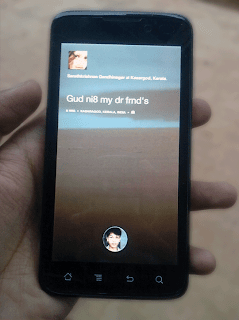
Whats the Trick ?
We are giving you a hacked version of Facebook Home which supports almost all of the android devices. This modding was done by a hacker called the os0o. He modded the app in order to bypass the device restrictions provided by Facebook.
How can I Install Facebook Home ?
Step #1 : Uninstall the Original
Yes. You have to Uninstall the original version of Facebook, Facebook Messenger etc, if you have already installed it in your phone. If your device
Step #2 :
Now after uninstalling original Apps, you have to Download the hacked version of all these apps.The Links are given below :
 Download Hacked version of Facebook Home Download Hacked version of Facebook Messenger
 Note :These files are not hosted by us.
Step #3 : Extract The Files
These files are compressed in .RAR. You have to extract these files. Now, you will have three files as listed below :
com.facebook.katana (Facebook App.)
com.facebook.home (Facebook Home)
com.facebook.orca (Facebook Messenger)
Step #4 : Install the Apps
After Extracting files, you have to install it orderly.
First install Facebook App (com.facebook.katana.apk )
Then install Facebook Home (com.facebook.home.apk )
Then installFacebook Messenger (com.facebook.orca.apk)
Now just open Facebook Home Application and you will see it Installed successfully.
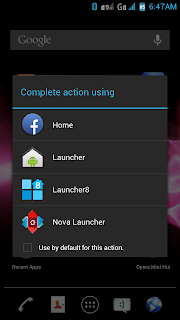
Selecting Facebook home as default launcherYou can also set Facebook Home as Default Launcher for Android.
Hope you enjoyed this one. Try to Install this one on your device and let me see how many can Install it.

No comments:
Post a Comment