Saturday, November 2, 2013

All NOKIA Secret Tips And Tricks

On the main screen type in:
*#06# for checking the IMEI (International Mobile Equipment Identity).
*#7780# reset to factory settings.
*#67705646# This will clear the LCD display(operator logo).
*#0000# To view software version.
*#2820# Bluetooth device address.
*#746025625# Sim clock allowed status.
#pw+1234567890+1# Shows if sim have restrictions.
*#92702689# – takes you to a secret menu where you may find some of the information below:
1. Displays Serial Number.
2. Displays the Month and Year of Manufacture
3. Displays (if there) the date where the phone was purchased (MMYY)
4. Displays the date of the last repair – if found (0000)
5. Shows life timer of phone (time passes since last start)
*#3370# – Enhanced Full Rate Codec (EFR) activation. Increase signal strength, better signal reception. It also help if u want to use GPRS and the service is not responding or too slow. Phone battery will drain faster though.
*#3370* – (EFR) deactivation. Phone will automatically restart. Increase battery life by 30% because phone receives less signal from network.
*#4720# – Half Rate Codec activation.
*#4720* – Half Rate Codec deactivation. The phone will automatically restart
If you forgot wallet code for Nokia S60 phone, use this code reset: *#7370925538#
Note, your data in the wallet will be erased. Phone will ask you the lock code. Default lock code is: 12345
Press *#3925538# to delete the contents and code of wallet.
Unlock service provider: Insert sim, turn phone on and press vol up(arrow keys) for 3 seconds, should say pin code. Press C,then press * message should flash, press * again and 04*pin*pin*pin# \
*#7328748263373738# resets security code.
Default security code is 12345
Change closed caller group (settings >security settings>user groups) to 00000 and ure phone will sound the message tone when you are near a radar speed trap. Setting it to 500 will cause your phone 2 set off security alarms at shop exits, gr8 for practical jokes! (works with some of the Nokia phones.) Press and hold “0″ on the main screen to open wap browser

FREE UNLIMITED SMS TRICK BY PACKET DATA 100% WORKING-5 october

 2013


Free sms trick 2013 is working only in Nokia symbian Smartphones. And also dont forget to keep your balance below Rs 1 before trying this trick. Now follow the steps below and enjoy unlimited free sms on your phone.So Frnds Use This Trick And Enjoy Free Sms By Pakect Data And Like My Facebook Page.
1.Go to settings > connection settings and make packet data always online.
2. Now you can see symbol G or or H on top of your phone.
3. Now go to message> settings> text message and select use packet data.
4. Now open any of your browser and connect the gprs.
5. Minimise your browser and now start sending sms for free.
Visit Daily For Latest Updates...
And Like My Facebook Page.

TRICK TO INSTALL FACEBOOK HOME ON ANY ANDROID POWERED DEVICE


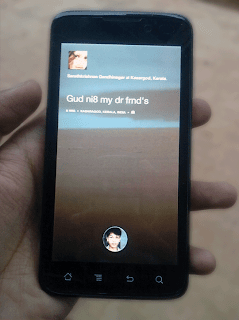
Facebook Home installed on Karbonn A21I hope You have read about the New Facebook Home which was released previous Friday. We said that this application supports selected phone models only. These includes Samsung Galaxy S III, Samsung Galaxy Note II, HTC One X, and HTC One X+. It will also be available on the Samsung Galaxy S IV and HTC One in the future.Now here is a Trick to Install Facebook Home on every Android device. I already installed it on my Karbonn A21 too. Why don't you try this trick on your Android Smart Phone ??
Whats the Trick ?
We are giving you a hacked version of Facebook Home which supports almost all of the android devices. This modding was done by a hacker called the os0o. He modded the app in order to bypass the device restrictions provided by Facebook.
How can I Install Facebook Home ?
Step #1 : Uninstall the Original
Yes. You have to Uninstall the original version of Facebook, Facebook Messenger etc, if you have already installed it in your phone. If your device manufacturers pre installed it, you need root access to remove those ones.
Step #2 : Download the Files
Now after uninstalling original Apps, you have to Download the hacked version of all these apps.The Links are given below :
 Download Hacked version of Facebook Home 
 Download Hacked version of Facebook Messenger 
Note :These files are not hosted by us.
Step #3 : Extract The Files
These files are compressed in .RAR. You have to extract these files. Now, you will have three files as listed below :
com.facebook.katana (Facebook App.)
com.facebook.home (Facebook Home)
com.facebook.orca (Facebook Messenger)
Step #4 : Install the Apps
After Extracting files, you have to install it orderly.
First install Facebook App (com.facebook.katana.apk )
Then install Facebook Home (com.facebook.home.apk )
Then installFacebook Messenger (com.facebook.orca.apk)
Now just open Facebook Home Application and you will see it Installed successfully.

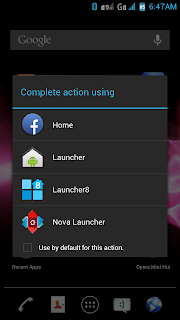
Selecting Facebook home as default launcherYou can also set Facebook Home as Default Launcher for Android.
Hope you enjoyed this one. Try to Install this one on your device and let me see how many can Install it.
tags:How to Install Facebook Home, How touse Facebook Home in Any Android Phone, Facebook Home for Sony Experia, Facebook Home for Other Samsung Galaxy phone and Tabs, Facebook Home for Micromax Phones and Tablets,

 UNLIMITED FREE CALLS ON AIRTEL AND RELIANCE GSM-1 APRIL 2013


First dial 000117 iske baad ye dabao 
8773444240
nd iske baad jab welcome to ATT bole aur
Xtension no mange to 111 ye dabana...
Iske baad ID mangega to
ID-8123456#, 8123439#, 812345#, 8738222#
password- 1234#
jab tumara fon connect ho jaye...!
To apne dost ke fon se bhi same yehi
karna...!
Dono ki call free me connerct ho jaygi...!
It is working 101%
.,!!
so enjoy..!!

 HOW TO CHANGE FACEBOOK LOGIN PAGE BACKGROUND-23 JUNE 2013


The World Most Using Social Networking Website Facebook, Its More Than 10 Million Users.When You Login To Facebook You See Same Old Background Of Your Facebook Login Page. You See Daily Same Page Its Feel Boring ,But There Is AGoogle Chrome Extension. This Extension Is Allow You To Change Your Background Facebook Login Image.
FB Refresh
Is Change Your Facebook Login Page As You Want And Friends You Also Use Your Own Pic. So Friends Read This Post And Ebjoy Your Own Facebook Login Page.How to change facebook login page background Read Below..
Follow These Steps To Change Your Facebook Login Page/Backgroung Image.
1.Download FB Refresh
Here And Install In Your Google Chrome Browser.
2.Once You Have Succsesfully Installed FB Refresh , Then Go To Options > Tools >Extensions.
3.Now You See Your FB Refresh Extension, Click On Option Button Below The FB Refresh Extensions.
4.And You Can Add URL Of Image You Want To Display In Your Facebook Login Page.
5.Go To Any Webpage And Select Any Image And Copy Its Url And Paste In FB Refresh Extension Url Box , You Can Also Choose Your Own Image File From Your Dextop. Click On Choose File To Add Your Custom Image File.
6.Click On Save Button And Log Out Facebook To View Your Custom Image.
7.Now Your Own Facebook Page Image Is Successfully Set On Login Page Of Facebook.
*.Note ::- This Extension Only Work If You Use Google Chrome Browser.
*.Like My Facebook Page And Share This Post. I Hope You Enjoy This Post.

 HOW TO CHANGE FACEBOOK LOGIN PAGE BACKGROUND-23 JUNE 2013


The World Most Using Social Networking Website Facebook, Its More Than 10 Million Users.When You Login To Facebook You See Same Old Background Of Your Facebook Login Page. You See Daily Same Page Its Feel Boring ,But There Is AGoogle Chrome Extension. This Extension Is Allow You To Change Your Background Facebook Login Image.
FB Refresh
Is Change Your Facebook Login Page As You Want And Friends You Also Use Your Own Pic. So Friends Read This Post And Ebjoy Your Own Facebook Login Page.How to change facebook login page background Read Below..
Follow These Steps To Change Your Facebook Login Page/Backgroung Image.
1.Download FB Refresh
Here And Install In Your Google Chrome Browser.
2.Once You Have Succsesfully Installed FB Refresh , Then Go To Options > Tools >Extensions.
3.Now You See Your FB Refresh Extension, Click On Option Button Below The FB Refresh Extensions.
4.And You Can Add URL Of Image You Want To Display In Your Facebook Login Page.
5.Go To Any Webpage And Select Any Image And Copy Its Url And Paste In FB Refresh Extension Url Box , You Can Also Choose Your Own Image File From Your Dextop. Click On Choose File To Add Your Custom Image File.
6.Click On Save Button And Log Out Facebook To View Your Custom Image.
7.Now Your Own Facebook Page Image Is Successfully Set On Login Page Of Facebook.
*.Note ::- This Extension Only Work If You Use Google Chrome Browser.
*.Like My Facebook Page And Share This Post. I Hope You Enjoy This Post.